Claude SEO: How Rank Math Connects Claude to Search Console and Finds the Quick Wins
Jack from Rank Math connects Claude's free desktop app to Google Search Console, then asks two questions: what grew, what dropped, and which searches sit just off page one. The full setup on Mac and Windows, his prompts, and what the same two asks found on my own site.

Co-founder of Pozy · Updated 22 Nov 2026 · 18 min read
After this article, you'll be able to:
- Connect Claude's free desktop app to your own Google Search Console, on a Mac or on Windows
- Set up the Google Cloud project, the permission screen and the key file without getting stuck
- Avoid the five mistakes he made or warned about, before you make them
- Ask Claude what grew and what dropped over 90 days, and what to do about it
- Find the searches where you sit on Google's page two, and decide: update a page, or write a new one
- Spot the two traps in that list: bot searches, and many pages chasing one topic
Search Console lists the searches that show your site. Reading it is the slow part.
Jack from Rank Math plugged Claude into it. Then he asked Claude to do a senior marketing analyst's job.
Two questions. What grew and what dropped over 90 days. And which searches sit just off Google's first page.
His setup is free.
I ran his two questions on my own site, profitablefounder.xyz, on 22 Nov 2026.
After I took out the bots, 80 searches were left where I rank between 11 and 20: Google's page two. For 9 of the top 10, I already have a close page, by my own matching.
80
searches where I rank 11 to 20, after taking out 5 that look like bots
905
clicks from Google from 8 Oct to 22 Nov, against 427 from 24 Aug to 7 Oct
37
pages with "mastermind" in the address that showed in Google, so some may chase the same searches
Let me show you exactly how it works.
Rank Math is not affiliated with Pozy.
#The big idea: let Claude read the numbers, not you
Search Console is Google's free tool. It tells you which searches showed your site, how often, and where you ranked.
Jack's fix is a connection called MCP. It's a standard way to plug Claude into another tool, so Claude reads it directly. His picture for it: without MCP, it's a LEGO brick against a wooden block. With it, both have the same bumps, and they click.
Once Claude can read Search Console, the analysis is one message. More like this in Claude workflows.
Two words you'll see below. Impressions are the times your site showed in Google's results. Position is where you ranked on average, 1 being the top. Page one is positions 1 to 10. Page two is 11 to 20.
#Step 1: Check that Node.js is on your computer
Jack's plan has five parts: Node.js, Claude's desktop app, a Google Cloud project, a small tool on your computer, then Claude's settings.
Node.js is a free program that, in his words, handles "the communication between Claude and other MCPs".
Open your terminal. That's the window where you type commands. On a Mac, it's the app called Terminal. On Windows, search "CMD" and open Command Prompt.
Type the line for your computer:
| Computer | Type this | You should see |
|---|---|---|
| Mac | node --version |
A version number |
| Windows | node -v |
A version number |
No version number? Download Node.js from nodejs.org/en/download. Open the file, agree to the license, click Install. On Windows, the file ends in .msi.
Run the same line again. The version number should show now.
#Step 2: Install Claude's desktop app
This needs the desktop app, not Claude in your browser. Download it from claude.com/download.
| Computer | What you do |
|---|---|
| Mac | Open the file, drag Claude into your Applications folder |
| Windows | Open the file, it installs, click Get started |
No Claude account yet? You can make a free one with your Google account.
His answer on the paid plan: "the answer is no". He ran the same task on the free and the Pro version.
#Step 3: Make a Google Cloud project and switch on Search Console
Google Cloud is Google's console for developers, at console.cloud.google.com. You use it once here, to give Claude permission.
Sign in with the Google account that can see your site in Search Console. Jack stresses this. A different account won't see your data.
The first time, Google may ask you to turn on two-step sign-in. Do it, then come back and refresh the page.
| Click | What to type or pick |
|---|---|
| The project picker at the top, then New Project | Any name. His: "Google Search Console Claude" |
| Create, then select the new project | Leave the project ID and the organization as they are |
| The search bar at the top | "Google Search Console API" |
| Enable | Without this, Claude can't read your data |
An API is Google's word for a door that lets one program read another. You switch the door on.
#Step 4: Set up Google's permission screen and download your key file
Next, Google needs a screen that asks you "do you allow this?". Google calls it the OAuth consent screen.
| Where | What to do |
|---|---|
| OAuth consent screen, Get started | App name: anything (he reused the project name). Add your support email |
| Audience | Pick External. Internal needs a paid Google Workspace |
| Contact | Your email, so Google can tell you about changes |
| Finish | Agree to the terms, Create |
| Clients, Create client | Application type: Desktop app. Any name. Create |
| The window that opens | Download the file. This is your key file |
| Audience, Test users, Add users | The Gmail accounts that can see your Search Console. My note: only accounts on this list can sign in while the app is in testing |
The key file is a small text file that tells Google which app is asking. Move it to a folder you won't touch, like a folder on your desktop. Jack kept his in Downloads, for the demo only.
#Step 5: Install the small tool that runs the connection
The connection is a little program that runs on your computer, called mcp-search-console. A free tool called uv gets it onto your computer. uvx is the part of uv that starts it.
On a Mac, type these four lines in Terminal, one at a time. From his guide:
curl -LsSf https://astral.sh/uv/install.sh | sh
source $HOME/.local/bin/env
echo 'source $HOME/.local/bin/env' >> ~/.zshrc
which uvx
The first installs uv. The second lets Terminal use it now, without a restart. The third makes that permanent. The last prints where uvx sits on your computer. Copy that line. You need it in Step 6.
On Windows, in Command Prompt. From his guide:
winget install astral-sh.uv
uv tool install mcp-search-console
where uvx
Type Y when it asks you to accept the terms. The second line installs the Search Console connection itself. The last prints where uvx sits. Copy it.
The Mac lines don't install the connection itself. Jack doesn't say why. My reading: uvx fetches it the first time Claude starts it.
#Step 6: Tell Claude where everything is
Now you paste a few lines into Claude's settings file.
In Claude's desktop app, open the left panel. Click your profile at the bottom left, then Settings, then Developer, then Edit Config. A folder opens with a file called claude_desktop_config. Right-click it and open it with TextEdit on a Mac, or Notepad on Windows.
The lines from his guide:
{
  "mcpServers": {
    "gscServer": {
      "command": "/FULL/PATH/TO/uvx",
      "args": ["mcp-search-console"],
      "env": {
        "GSC_OAUTH_CLIENT_SECRETS_FILE": "/full/path/to/your-key-file"
      }
    }
  }
}
I renamed his blank for the key file's path to plain words. A path is a file's full address on your computer, like /Users/you/Desktop/key-file. Replace the two blanks:
| Blank | Put there | How to get it |
|---|---|---|
| /FULL/PATH/TO/uvx | Where uvx sits | The line which uvx or where uvx printed in Step 5 |
| /full/path/to/your-key-file | Where your key file sits | Mac: drag the file into Terminal, it prints the path. Windows: right-click the file, Copy as path |
On Windows, two more fixes, or it won't start. Double every backslash in both paths, like C:\\Users\\you\\Downloads. And Copy as path adds quote marks: keep one at each end, delete the extra.
Where to paste depends on what's in the file already:
| Your file | What to copy |
|---|---|
| No connections yet (just { } or a preferences line) | Everything except the first and the last curly bracket. The file already has them. If other lines are there, put a comma between them and the new block |
| Already has "mcpServers" in it | From "gscServer" down, without the last two closing brackets. Paste it right after the opening bracket of "mcpServers" |
You can't have "mcpServers" twice. Jack's rule: add a comma after each connection's closing bracket. My addition: not after the last one in the list.
Copy the whole file somewhere safe first (see his warnings below). On a Mac, closing the file saves it. On Windows, use File, Save.
#Step 7: Restart Claude and check the connection is running
Quit Claude fully, then open it again. Go back to Settings, then Developer.
- Quit Claude
- Open it again
- Settings, Developer
- "gscServer" shows as running
Jack had two connections running: this one, and his Rank Math one for WordPress.
#Step 8: Ask Claude what it can see
His first message, in a new chat:
Do you have access to my GSC properties?GSC is short for Google Search Console. A property is one site in it.
Claude asks for permission to use the connection. He clicked Always allow, then Allow again. The first time, a Google sign-in opens in your browser. Use the same Google account as in Step 3. Google shows "Google hasn't verified this app". It's your own app, so he clicked Continue, then Continue again.
Back in Claude, it listed his sites. Then he asked for the list of tools:
Can you provide me with all the MCP tools available for gscServer?Some of the tools on his screen:
| Tool | What it does, from Claude's list |
|---|---|
| get_performance_overview | A quick summary of a site's numbers |
| get_search_analytics | Searches, pages, devices, countries, dates |
| get_search_by_page_query | The searches behind one page |
| compare_search_periods | Two date ranges side by side |
| check_indexing_issues | Checks pages for problems getting into Google |
#Step 9: Ask what grew and what dropped over 90 days
His first real ask, word for word from his guide:
Act as a Senior Marketing Analyst. Use get_performance_overview for [Site URL] over the last 90 days. Compare it to the previous 90 days. Identify the top 3 growth areas and the top 3 areas of decline. Based on this, suggest which content categories we should prioritize for our new marketing plan.Replace [Site URL] with your site. He ran it on a test site, and said so: not much traffic.
What Claude answered, from his screen:
| Claude's answer | On his test site |
|---|---|
| The headline numbers, 90 days | 8 clicks, 4,983 impressions, 0.16% click rate, average position 77.4 |
| Top 3 growth areas | Topic groups whose impressions rose, with each page's change |
| Top 3 areas of decline | Pages that lost clicks or fell out of the results |
| What this means for the plan | Three lists: prioritize, fix, deprioritize |
On a small site, it still named the trend. Impressions jumped from 10 June, while positions fell. Claude's reading: Google was showing many more of his pages, but ranking them poorly.
Claude asks for permission again here, a few times. It uses several tools at once.
#Step 10: Find the searches stuck on page two
His second ask, word for word from his guide:
Use get_search_analytics to find queries where my site has high impressions but an average position between 11 and 20. List the top 10 keywords. For each, suggest whether I should update an existing page or create a new 'Ultimate Guide' to break onto page one.The point, in his words: find "the pages and keywords that are almost ranking at the top, but it's not there yet".
What Claude answered on his test site, from his screen:
| His result | |
|---|---|
| Searches checked | 721, over 90 days |
| In positions 11 to 20 | 0 |
| Claude's reading | The site ranks either very high (1 to 7) or very low (50 and beyond) |
| What it did next | Listed the nearest searches instead |
It said so instead of inventing a list.
His guide has 8 more asks, like click rates, mobile against desktop, pages that lost traffic since last year, pages not yet in Google, and a 6-month plan. The link is under his video.
#The same two asks, on my site
profitablefounder.xyz is the blog of my podcast, Profitable Founder. On 22 Nov 2026, I had Claude run both of his asks on it.
One difference. I didn't install his connection. My Claude already reads that site's Search Console through Distribb, my own SEO tool. Same Google numbers, different door. Distribb goes back 90 days at most, so I split them in two halves of about 45 days.
What grew and what dropped. Clicks went from 427 to 905. Impressions doubled, from 55,570 to 110,817.
| Page | Clicks, 24 Aug to 7 Oct | Clicks, 8 Oct to 22 Nov |
|---|---|---|
| how-omar-built-triips | 0 | 83 |
| how-iman-gadzhi-made-his-money | 1 | 41 |
| fortnite-map-business | 12 | 41 |
| is-starter-story-worth-it | 4 | 34 |
| make-money-with-gpt-6-astra | 34 | 10 |
| The home page | 26 | 13 |
| /club | 15 | 5 |
| linkedin-ai-agent | 22 | 14 |
Two founder stories lead the growth. One AI article leads the drop (34 to 10 clicks), then the home page, /club, and a second AI article. /club is the page that sells my founder community, so it's the drop that worries me most.
The page-two searches. 85 of the top 1,000 searches sat between position 11 and 20. 5 of them had "site:" strings in them, like a search followed by a long list of "-site:facebook.com -site:youtube.com". Most likely bots. I took them out. That leaves 80.
The top 10 by impressions, and my closest page for each:
| Search | Impressions | Position | My closest page |
|---|---|---|---|
| "solo founder" saas | 400 | 12.1 | /blog/solo-founder-saas |
| ceo mastermind group | 96 | 19.2 | My mastermind list pages |
| "microconf" | 45 | 15.8 | /blog/is-microconf-worth-it |
| best bootstrapped saas podcasts tools 2026 | 39 | 14.0 | Podcast lists, none with that name |
| eo vs ypo | 36 | 17.6 | /blog/eo-vs-ypo |
| online mastermind groups | 34 | 15.6 | /blog/online-mastermind-groups |
| agent os yc 2026 ai employees launch | 33 | 13.4 | None by that name |
| best mastermind for agency owners | 32 | 14.1 | My mastermind list pages |
| best saas podcasts tools 2026 | 19 | 13.8 | Podcast lists, none with that name |
| indie hackers podcast | 17 | 14.2 | /blog/best-indie-hacker-podcast |
The right column is mine, matched by the page's address, so the positions are the search's, not the page's. Distribb doesn't tell me which page Google showed for each search. His connection can, with get_search_by_page_query.
Then the pages themselves. 51 pages average a position between 11 and 20. The top 8:
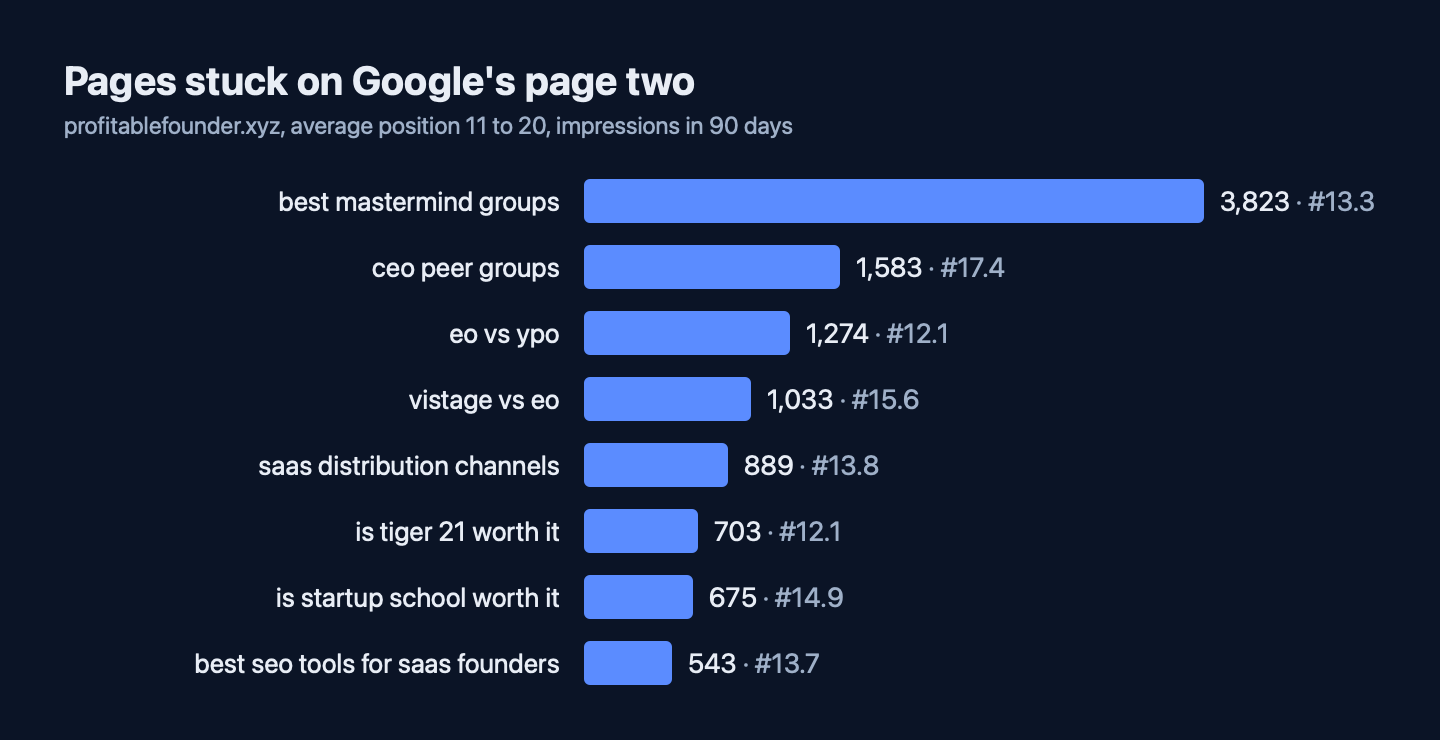
#What I'd do with it
His ask ends with "update an existing page or create a new 'Ultimate Guide'". On my site, the answer is almost never "new". The order below is mine, mostly by impressions.
| Order | What | Why |
|---|---|---|
| 1 | Update /blog/best-mastermind-groups-for-entrepreneurs | 3,823 impressions at position 13.3, the biggest page on page two |
| 2 | Check my mastermind list pages against each other | top-saas-mastermind-groups (position 8.8), online-mastermind-groups (10.7), saas-mastermind-reviews (9.6) and best-saas-mastermind-programs (6.4) cover close ground. If they show for the same searches, Google may not know which one to rank |
| 3 | Update ceo-peer-groups, eo-vs-ypo and vistage-vs-eo | 1,583, 1,274 and 1,033 impressions, at 17.4, 12.1 and 15.6 |
| 4 | Make /blog/solo-founder-saas answer "solo founder" saas | 400 impressions for that search at 12.1. The page itself averages 8.7 |
| 5 | Look at the home page and /club | Clicks fell by half on the home page and by two thirds on /club. /club sells my community |
| 6 | Maybe one new page: the "agent os" search | The only top 10 search with no close page at all. 33 impressions, and it looks like news: low priority |
Point 2 is my reading of the addresses, not proof. I'd check it first with get_search_by_page_query, which shows the searches behind each page. Merge two pages only if they really chase the same searches.
None of this is done yet. It's on me.
#What went wrong before it worked
Jack made two mistakes on camera, on Windows, and left them in. He warned about three more. The sixth row is mine.
| Mistake | What happens | The fix |
|---|---|---|
| Single backslashes in a Windows path, and he missed one | Windows reads them as bad characters. The connection doesn't start | Double every backslash, then check each one |
| Copy as path adds quote marks | Two quote marks around the path, and an error | Delete the extra one |
| A typo in the Mac settings file (his warning) | The file can revert to the default, with your other connections gone | Copy the whole file somewhere before you edit |
| Save as on Windows (his warning) | There may be a duplicate file | Use File, Save |
| Claude loses access after a week (my note, from Google's sign-in docs) | Google says an app in Testing, with External users, gets a sign-in that expires in 7 days | Expect to sign in with Google again. Jack doesn't cover this |
| The wrong Google account (his warning) | Claude can't see your site's data | Use the account that sees your site in Search Console, in Step 3 and Step 8 |
And two traps from my own run:
- Bots search too, most likely. 31 of my top 1,000 searches had "site:" strings in them. 5 landed in the page-two list. Tell Claude to drop them.
- "Create a new guide" can make it worse. If you already have pages on the topic, a new one can split Google's attention further. Ask Claude to check your existing pages first.
#What I'd steal from this, today
→ Let Claude read Search Console. One setup, then every question is one message.
→ Start with the 90-day health check. It tells you what's growing before you plan anything.
→ Hunt page two, not page five. Positions 11 to 20 are the ones a push can move.
→ Ask "which page do I already have?" before "what should I write?". On my site, 9 of the top 10 searches had a close page already.
→ Clean the list before you act. Bot searches and duplicate pages look like work. They're not.
Your turn
#How to do this with Pozy
Pozy reads your Search Console too, read-only, with a Google sign-in. No Google Cloud project, no settings file. But it holds less: totals for the last 28 days against the 28 before, and your top 10 searches and pages. It keeps them day by day from the day you connect. Enough for the headline numbers now. Which pages grew or dropped needs a month of Pozy's daily records. The page-two hunt needs Jack's setup.
My personal site, floriandarroman.com, is connected in Pozy. Its card on 22 Nov 2026: 8 clicks and 63 impressions in 28 days.
Then Pozy does the part Search Console can't: it can update the article on your blog (WordPress, Shopify, Wix or Webflow) and post about it. I haven't run that part through Pozy yet: profitablefounder.xyz isn't connected as a blog in Pozy.
- Connect Search Console in Pozy. Inputs, the Google Search Console card, Connect. Sign in and pick your site (connect Google Search Console). Your AI can't do this step for you.
- Connect your blog, if you want your AI to update pages. Connections, Accounts, New connection.
- Add Pozy to Claude. It's one link: add Pozy to Claude. ChatGPT and the others work too.
Use Pozy for this. Read my project's Google Search Console numbers. Compare the last 28 days with the 28 before. If you have a month of daily records, tell me which pages grew and which dropped, and which of my top pages rank between 11 and 20.
Use Pozy for this. Here is my page that sits on Google's page two: [page address]. People search for "[search]". Find the article on my blog, rewrite it to answer that search better, and show me the changes before you save anything.
Use Pozy for this. Make a short link to [updated page] and write one post about it for LinkedIn and X. Show me the plan, then tell me how many clicks the link gets this week.
Use Pozy for this. It's been 28 days since I updated [page address]. Read my Search Console numbers again and tell me if it moved closer to page one. If the page isn't in my top 10 pages, say so: you can't see its position then. If you cannot see Pozy's tools yet, tell me how to connect Pozy first.
The short links in the third prompt are Pozy's short links, on pozy.li. Each click is counted. For your site's visits, see Claude + Google Analytics.
#Questions
Is it safe to give Claude my Search Console? Claude sees the searches and pages of every site your Google account can see in Search Console. So connect an account you're fine sharing. His guide also has asks that manage sitemaps (the list of your pages you give Google), so his connection can do more than read. Jack doesn't say who makes it. Keep the key file from Step 4 private. Pozy's connection is read-only: it can't change anything in Search Console.
Do I need to pay for Claude? Jack says no. He ran the same task on the free and the Pro plan.
Does this work with Claude in the browser? His setup needs Claude's desktop app, because the connection runs on your computer. Pozy's connection works from Claude in the browser too.
Can Claude change my pages for me? Not with his setup: it works on Search Console, not on your site. Rank Math's own connection works with WordPress, and he ran it next to this one. Pozy can update articles on WordPress, Shopify, Wix and Webflow. Ask it to show you the changes first: edits to a published article go live right away. Running a Shopify store from Claude goes further: Claude + Shopify.
Why does Pozy show fewer searches than his setup? Pozy keeps the top 10 searches and pages, from the day you connect. A page-two search with many impressions but few clicks can be missing from that top 10. For the full list, his connection asks Google directly.